• UCLA
  • College
  • Life Sciences
Life Sciences Administration
  • Home
  • People
    • Alphabetical list
    • Building and Operations Staff
    • Computing Staff
    • Administrative Staff
  • Computing
  • Building Ops
  • Space Reservation
    • UCLA Requestors
    • List of Spaces
    • Private Event
    • UCLA Life Sciences Booked Scheduler
  • Academic Services
    • Course Scheduling
    • Course Evaluations
    • Course Textbooks and Desk Copies
    • Printing and Copies
  • Administrative Services
  • Click to open the search input field Click to open the search input field Search
  • Menu Menu

Archive for category: Email

You are here: Home1 / Sample Page2 / Self Help3 / Email

UCLA Gmail Setup in Outlook for iOS (iPhone/iPad)

January 4, 2021/in Email

Download Outlook for iOS from the iOS App Store

UCLA Gmail Setup Instructions for Outlook on iOS (iPhone/iPad):

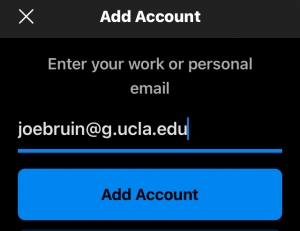
  1. If it’s your first time using Outlook for iOS, enter your full email address, then tap Add Account.
  2. If not, open the Menu > tap Settings Outlook app settings > Add Account > Add Email Account.
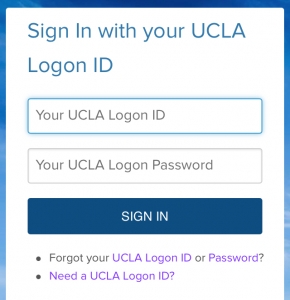
  3. After authenticating your credentials, select your UCLA Gmail account.
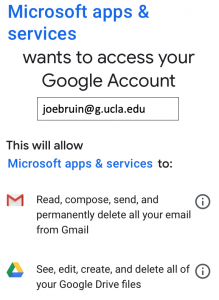
  4. When the following screen appears, scroll down and click “Accept”
  5.          

Your UCLA Gmail account will now be in Outlook on your iPhone or iPad

For non-UCLA email setup, click on the link below:

Generic Account Setup Instructions

https://sites.lifesci.ucla.edu/lsadmin-home/wp-content/uploads/sites/238/2023/05/Life-Sciences-Administration-w_-LS-no-side-padding-1030x204.png 0 0 michaelpdavis https://sites.lifesci.ucla.edu/lsadmin-home/wp-content/uploads/sites/238/2023/05/Life-Sciences-Administration-w_-LS-no-side-padding-1030x204.png michaelpdavis2021-01-04 16:33:202021-01-04 17:00:26UCLA Gmail Setup in Outlook for iOS (iPhone/iPad)

Recommended Specifications

November 20, 2020/in Outlook on Mac

We think you should buy this: Xenon 880


https://sites.lifesci.ucla.edu/lsadmin-home/wp-content/uploads/sites/238/2023/05/Life-Sciences-Administration-w_-LS-no-side-padding-1030x204.png 0 0 JONATHAN https://sites.lifesci.ucla.edu/lsadmin-home/wp-content/uploads/sites/238/2023/05/Life-Sciences-Administration-w_-LS-no-side-padding-1030x204.png JONATHAN2020-11-20 10:33:002020-11-23 09:14:22Recommended Specifications

More trouble with emailing on a mac

November 17, 2020/in random Sub category of Email Mac

test of subcategory email

https://sites.lifesci.ucla.edu/lsadmin-home/wp-content/uploads/sites/238/2023/05/Life-Sciences-Administration-w_-LS-no-side-padding-1030x204.png 0 0 Grant Alkin https://sites.lifesci.ucla.edu/lsadmin-home/wp-content/uploads/sites/238/2023/05/Life-Sciences-Administration-w_-LS-no-side-padding-1030x204.png Grant Alkin2020-11-17 11:10:552020-11-17 11:10:55More trouble with emailing on a mac

setting up Apple Mail

November 16, 2020/in Email - Mac

setting up apple mail using google is…

https://sites.lifesci.ucla.edu/lsadmin-home/wp-content/uploads/sites/238/2023/05/Life-Sciences-Administration-w_-LS-no-side-padding-1030x204.png 0 0 Grant Alkin https://sites.lifesci.ucla.edu/lsadmin-home/wp-content/uploads/sites/238/2023/05/Life-Sciences-Administration-w_-LS-no-side-padding-1030x204.png Grant Alkin2020-11-16 10:00:202020-11-16 10:00:20setting up Apple Mail

Life Sciences Administration

612 Charles E. Young Drive East
UCLA/Box 957246
Los Angeles, CA 90095-7246

Information

Directory
Academic Calendar
Careers

Getting Around

Maps & Directions
Parking
Campus Shuttles
Public Transit

Connect

Alumni
Prospective Students
Current Students
Parents & Families
Faculty
Staff
Media & Journalists
  • UCLA Home
  • UCLA Life Sciences
  • Terms of Use
  • Accessibility
  • Emergency & Campus Safety
Scroll to top Scroll to top Scroll to top